SybqaExample report

QC inspection certificate Example

Your example site has 1 problem to fix.

Next: open tag 1 and paste its fix brief into your AI coding tool. 2 more checks are still open, so this is not the whole picture.

Example data · three release journeys · mobile 390 × 844

Fix these first

Results

Only Passed counts as passed. Blocked, Not run and Needs review are still open.

Fix these first

Each tag is one problem. Repeats across pages and screen sizes are grouped. Sorted by how serious each looks, then by how many pages it touches. Start at tag 1.

  1. Fix 01 of 01

    Failed

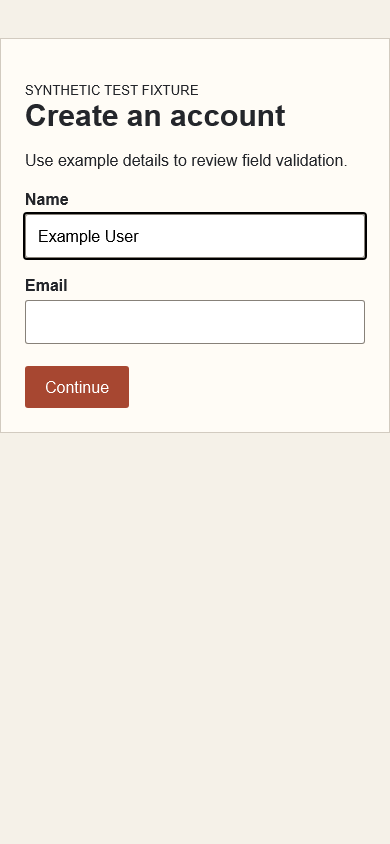
    Reading: Name field: empty

    was Example User

    observed in the browser

    Seen on
    /signup (example)
    Sizes
    mobile
    Replayed
    Not replayed

    Signup clears the name after an email validation error
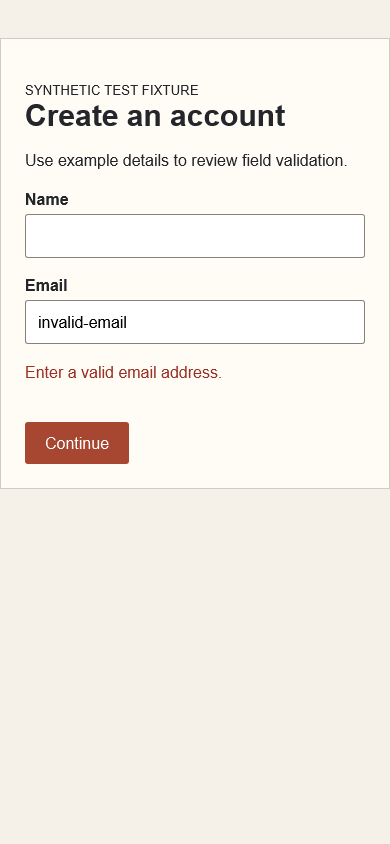
    Example signup form with the name cleared and an invalid email error
    signup-validation.png

    Steps to reproduce

    1. Open the synthetic signup form at the agreed viewport.
    2. Enter a synthetic name and an invalid email.
    3. Submit and inspect field values and the validation message.
    View illustrative reproduction steps

    Why it matters: In this example the user must enter the name again before continuing. No conversion impact has been measured.

    Suggested change: Retain form values on validation failure and show the email error beside the field.

    What you should see: The name stays while the email error shows.

    What happened: The name field was empty after submitting.

    Example fix brief
    Problem: submitting an invalid email clears the name field on /signup (mobile).
    Change: keep unaffected field values when validation fails.
    Check: repeat the steps above, then run the failed check again.

    Brief: fix-briefs/example.md
Not a pass yet

None of these count as passed. Blocked and Not run mean Sybqa could not look. Needs review means a possible problem a person should judge.

Blocked Blocked (1)
  • Onboarding cannot start: test session expired

    /onboarding (example) · authentication prerequisite

    Why it is open
    The example test returns to sign-in before reaching onboarding. Whether onboarding works with a valid session is unknown.
    Next step
    Provide a valid test session, then run again.
Needs review Needs review (1)
  • “Continue” may not explain the next step

    Signup copy review (example) Advisory

    Why it is open
    No participant study or observed hesitation supports this suggestion.
    Next step
    Consider a label that describes the destination, if the next step is predictable.
Not run Not run (1)
  • Saved preferences were not tested

    /preferences (example)

    Why it is open
    This check was skipped in the example run.
    Next step
    Run again with a session that can save preferences.

Hand it off

Paste the summary into chat, send the PDF to a teammate, or give the files to your tools.

No button? Press Ctrl or Cmd + P.

Preview the summary
Sybqa QC certificate: Example
Verdict: Issues found. 1 problem to fix.
Results: 1 failed · 1 blocked · 1 need review · 1 not run · 0 passed
Only passed checks count as passed. Blocked, not run and needs review are still open.
Fix these first:
1. Signup clears the name after an email validation error (Name field: empty, was Example User) · mobile
Still open: 3 checks.

A real report also lists report.md, report.json, junit.xml and fix-handoff.md here.

The evidence behind this

Everything above comes from these records.

Watch it happen1 recording

Recorded by Sybqa’s WebKit runner at 390 × 844. Playback is slowed to make the actions easier to inspect. This fixture deliberately clears the name after an invalid email submission.

Actual local runner capture · synthetic fixture · no customer data

Download WebM recording
  1. Open signupRunner waits for the synthetic form to be ready at mobile width.
  2. Fill name and emailIt enters “Example User” and an invalid email address.View captured name state
  3. Submit and inspectIt clicks Continue, checks the validation message, and captures the cleared name field.View captured validation state
Fix verification keeps the original failureExample
  1. Original run: failing. Invalid email clears name. The original observation stays in history.
  2. Comparable rerun: recheck passed. Same journey, assertions and viewport pass on this attempt. Resolution still requires review; an intermittent failure may recur.
Coverage still missingExample

Saved preferences remain not tested in this example. Other browsers, account roles, payment providers, email delivery and production data were not evaluated.

Captured does not mean passed. Pages and states Sybqa did not find are unknown, not clean. Real reports keep the exact tested scope and the evidence needed to reproduce each result.